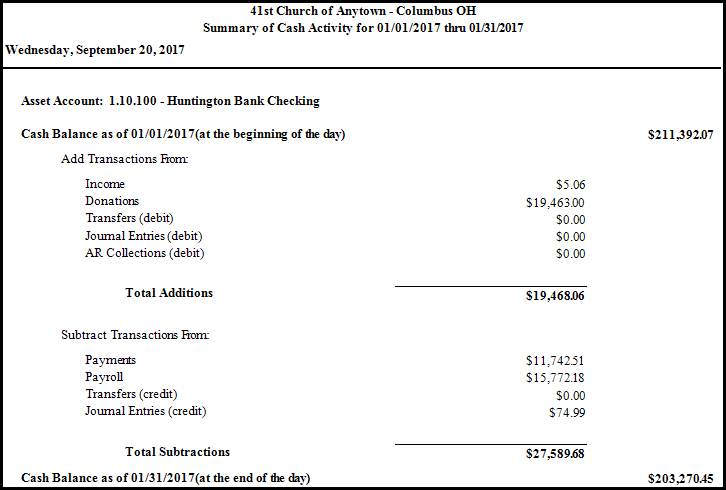
Summary of Cash Activity
The Summary of Cash Activity report allows you to print the beginning balance for an asset account, list each category of transaction that added money to the account (debits), list each category of transaction that subtracted money from that account (credits), and a balance as of the end of the day or designated time period.
To view or print the Summary of Cash Activity:
- Click Reports/Export in the Button Bar at the top of the screen.
- Click the Worksheets button and a menu will show the option for Summary of Cash Activity.
- Click the Summary of Cash Activity option.
- Accounting Year —
Choose the desired year from the dropdown box. - Date Range —
Click the dropdown boxes and choose the beginning and ending dates. (If you wish to run a report for only one day, choose the same date from both Date Range boxes.) - Asset Account —
Click the dropdown box to choose the desired account from the list of Assets. - Choose the desired Asset Account you wish the report to show.
- Click the Fonts tab if you would like to change the size and style of the font that prints on the report.
- Then, choose the Page Header, Column Headings, and/or Body Text settings, and apply your selections.
- When you click OK, a sample set of text will show you how the report text will print due to the selections you made.
- Click Reset to Default to change all fonts to their original settings.
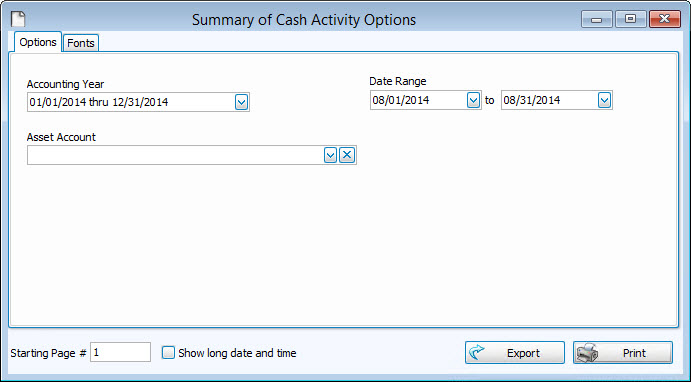
Once you have made all of your selections, click Print to view a Print Preview and then proceed in sending the file to your printer. You can also Export most reports and/or Send via Email as a file to be used outside of Church Windows.